Use cases
From a SharePoint library to an answer you can verify.
The most common path among our customers, step by step — then a complex answer broken down, and the list of what requires additional integration.
Sources
Connecting a SharePoint, in five steps
Count half a day with your IT provider for the first step, a few minutes for the rest.
- 1
One Microsoft authorisation, once
Your IT team — or your provider — consents to a read-only Microsoft Entra ID application on files and sites. No service account to create, no password to hand over to us, and the authorisation is revocable by you at any time.
- 2
You choose the scope
A SharePoint library or a business OneDrive, and a specific subfolder if needed. We almost always start small: a quality space, a procedures folder, a legal directory.
- 3
You set the filters
File extensions, last-modified date, path keywords to include or exclude, maximum size. This is what stops you from indexing ten years of drafts and inflating the bill for nothing.
- 4
The sync runs
Hourly, nightly, weekly or on demand. Only files changed since the last pass are re-read, and a deletion on the SharePoint side removes the document from the knowledge base.
- 5
Documents become answerable
Every file goes through Pending → Processing → Indexed. The bytes stay with Microsoft: the platform only stores a reference and fetches the file on demand. A file can be permanently excluded and never come back, even if it still matches the filters.
The proof
A question that touches two documents at once
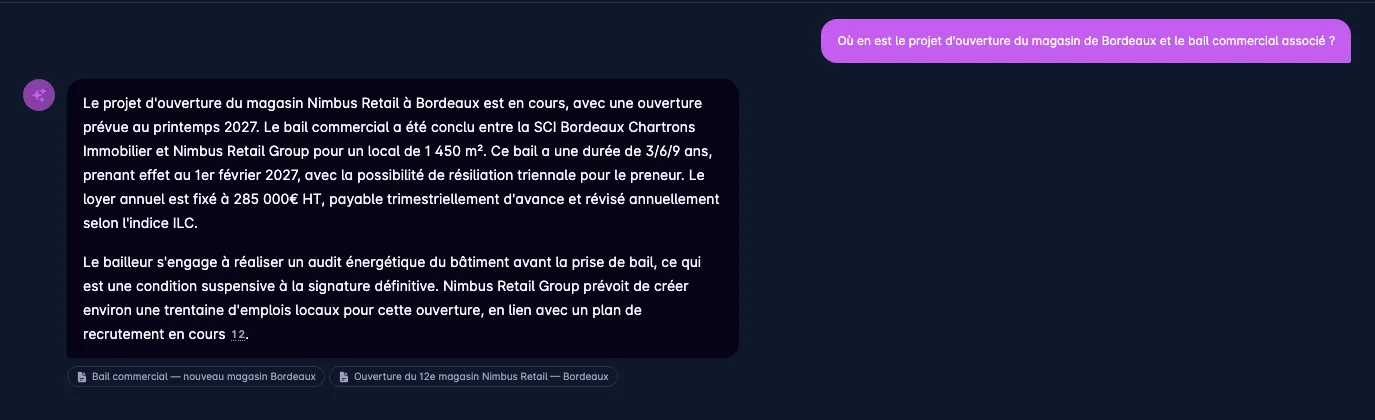
Here is a real answer, produced on our demo corpus. The question mixes the status of a project with the terms of a contract — two separate documents, two different registers.
“Where does the Bordeaux store opening project stand, and the associated commercial lease?”
Click the screenshots to enlarge them.
- 01
Two sources, not a blur
The answer cross-references a store opening note and a commercial lease. Both documents are cited separately under the answer, and clickable.
- 02
Figures that come from the contract
Floor area, 3/6/9 term, effective date, annual rent, indexation clause: these are the lease terms, not a loose paraphrase.
- 03
A condition precedent surfaced
The energy audit conditioning final signature appears in the answer because it is written in the document — exactly the detail a busy colleague would have missed.
- 04
Nothing invented around it
No date, no amount, no commitment that is absent from the two cited documents. What is not in them does not appear.
Use cases
One platform, several jobs.
The first three work from go-live. The next three require integration with your tools, which we scope, quote and build.
- Included
Internal documentation
“What is the procedure for…?” — a sourced answer, taken from the latest version in the base.
- Included
Onboarding and training
A newcomer asks the knowledge base rather than an already-busy colleague, and checks where the answer came from.
- Included
Decision support
Cross-reference several documents without confusing two files, thanks to passage re-ranking.
- Quoted separately
Draft replies
Automatically prepare an email or ticket draft inside your tool, from your own rules. Requires integration.
- Quoted separately
Support desk assistance
Plug the base into your ticketing tool so the agent gets the applicable procedure while answering. Requires integration.
- Quoted separately
Integration with your tools
CRM, intranet, n8n, internal applications: the scoped API and signed webhooks exist, the wiring gets built.
Quoted separately
What we build next, on quote
The knowledge base is the foundation. Everything that plugs it into your other tools is integration work: we study it, quote it and build it — the API and webhooks required are already shipped.
- Quoted separately
Draft reply inside your tool
A ticket arrives, the platform prepares a suggested reply grounded in your procedures, with its sources. The agent reviews, edits, sends. Nothing goes out automatically without review, unless you decide otherwise.
Generation API · webhooks · your ticketing tool
- Quoted separately
Support assistant inside the CRM
The customer record opens and the assistant surfaces the applicable procedure and the relevant documentation, without leaving the tool your teams already use.
Search API · your CRM
- Quoted separately
n8n or equivalent automations
A shared inbox, a form or a file drop triggers a chain: qualification, suggested reply, notification, archiving.
Signed webhooks · n8n, Make, Zapier
- Quoted separately
Custom connector
Your industry DMS, your ERP, an in-house intranet: the connector architecture lets us add one without touching the rest of the platform.
Dedicated development · from €2,500
We do not sell these automations as included, because they are not. They are designed with you, once the knowledge base is running and you know what your teams actually ask of it.
Discuss your caseWhere to start
The documentation AI diagnostic
€1,500 excl. VAT3 days · delivered within a week
We do not run free demos on your documents: we run a paid diagnostic, fully deducted from the project if you sign within 30 days.
Book 20 minutes- A map of your knowledge sources: where the information lives, who maintains it, what is out of date.
- Three use cases quantified in hours and euros, ranked by effort versus gain.
- A real mock-up on your own documents: 20 to 50 of your files indexed, 10 questions from your teams, the answers obtained and their sources.
- An architecture and compliance note: where data lives, what goes to the model provider, what does not.
This type of diagnostic is eligible for several French public schemes supporting digital and AI transformation — we tell you which ones apply to your case.
Twenty minutes is enough to know whether this is for you.
We show you the tool on a demo corpus close to your line of work: a real question, its sourced answer, a question with no answer, and the cost dashboard. No commitment.